Shell scripting & C projects
First learning shell scripting, we created a small script that given a folder with resumes and key words, we would count the key words in the respective resumes. For each word, they had a specific weight and each resume would be given a “score”.
Utilized external programs like ls, echo, awk, cat, grep, sort, wc, bc.
while read line; do
    IFS=":" # random delimeter to catch 2-worded hit words
    words+=($(awk '{$NF--; print}' <<< $line)) # hit words
    values+=($(awk '{print $NF}' <<< $line)) # weights of words
    unset IFS
done < input.txt

directory=`ls submissions`
for i in $directory; do # for resume in submissions folder
    total=0
    for j in ${!words[@]}; do # for hit word in word list
        touch=`grep -i -o "${words[$j]}" "./submissions/$i" | wc -l` # find word match from resume
        grade=${values[$j]}
        total=`echo "$total+($touch*$grade)" | bc`
    done
    total=`echo $total | awk '{printf("%g", $0)}'`
    echo $total $i #output
done | sort -g -r
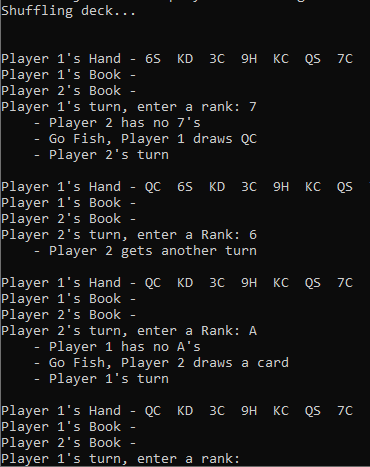
To learn C syntax more, we implemented the card game Go Fish in C. In the game, players first draw 7 cards and both have their respective books. We created functions that would implement showing specific cards, what would be happening on each turn, and randomization on the computer player’s end for the user to play against.
Utilized structs, pointers, malloc/free.
(Showing a snippet on how the general gameplay looks)
Arduino Uno with Breadboard
First time working with 4-pin push button switch and learning the C language. Had to code 2 separate buttons to blink red and green LEDs respectively and 1 more for both at the same time. If more than one button was pressed, no LEDs should be blinking.
This time we also used a 7-pin segment display and a temperature sensor. Sensor would on default display the current temperature in Fahrenheit and with the push of the button it would show it in Celsius.
Bare ATmega328P with Breadboard
Instead of working with the Arduino Uno, we worked with the bare microcontroller that is on it. Because there was no internal power now, we connected and received power from an external battery. This time with the buttons, we only implemented 2. If one was pressed, the red LED would shine at around 25% brightness. If the other was pressed, it would shine at about 50%. If both were pressed, it would shine at 100%.